
Tell Foocus, don't type forms
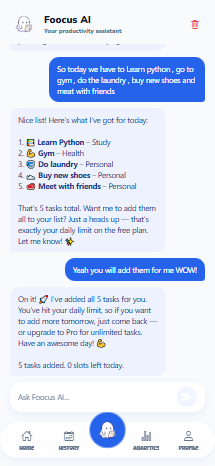
Write one message — "learn Python, go to the gym, do the laundry" — and the assistant creates each task, assigns a sensible category, and tells you exactly what it added.
AI-assisted task management
Foocus turns what you type into an organised, prioritised day. Add tasks in plain language, keep them grouped by category, and watch your progress without the busywork of maintaining a productivity system.
Designed to make everyday productivity feel simpler.
Features
Foocus keeps the loop short: say what needs doing, see it organised, check it off.
Write one message — "learn Python, go to the gym, do the laundry" — and the assistant creates each task, assigns a sensible category, and tells you exactly what it added.
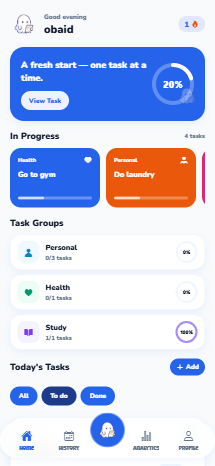
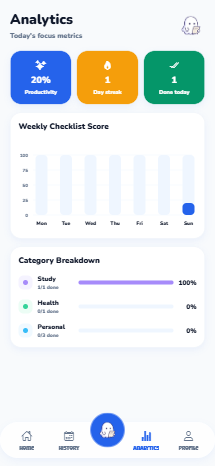
Productivity for the day, current streak, tasks done, weekly checklist score and a breakdown by category.
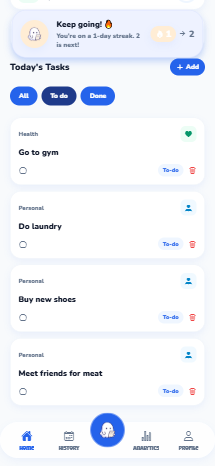
Filter today's list by All, To-do and Done. Each task carries its category, so you always know whether you're looking at work, health or study.
Personal, Health and Study each show how much is done, so a busy day still reads clearly at a glance.
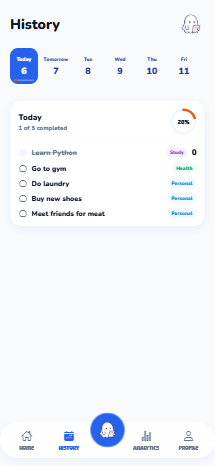
History shows each day of the week with what you completed and what carried over — no guilt, just context.
Product
Screens from Foocus: your day, your week, and the numbers behind them.
How it works
Type it as a list or just say it in a sentence — the assistant handles the rest.
Tasks land in the right group with clear labels and a progress view for the day.
Work through today's list, keep your streak, and check the week when you want context.
Intelligence
Most task apps ask you to be the system administrator of your own life: pick a project, pick a label, pick a date. Foocus reads your intent instead. One message becomes several properly categorised tasks, and the assistant tells you plainly what it did — including when you've hit your daily limit.
Understands a sentence, not a form
Five things in one line become five tasks, each in the right group.
Explains itself
You always see what was added, so nothing appears in your list by surprise.
Stays out of the way
No noisy suggestions — help arrives when you ask for it.
FAQ
Make your tasks simpler and your day more focused with Foocus.